문제 상황
새로운 체크리스트가 생성된 경우, Custom Alert을 띄워주고 싶었으나 Alert이 화면에 나타나지 않는 이슈 발생!!
deinit 메서드를 활용해서 디버깅 해보니 2가지 문제점을 발견했습니다.
문제점과 해결 과정
1. Post 전에 addObserver가 일어나야 한다!
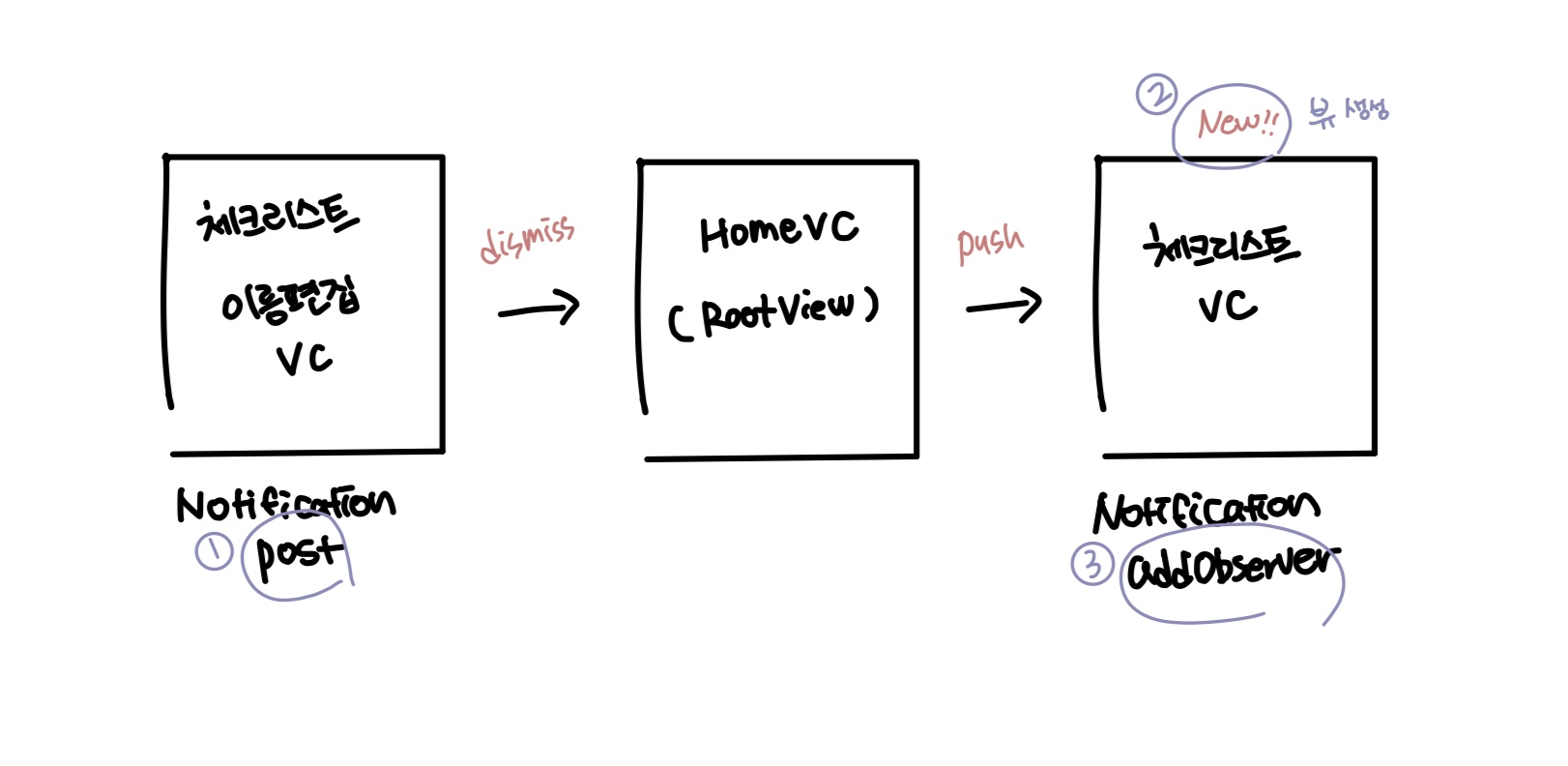
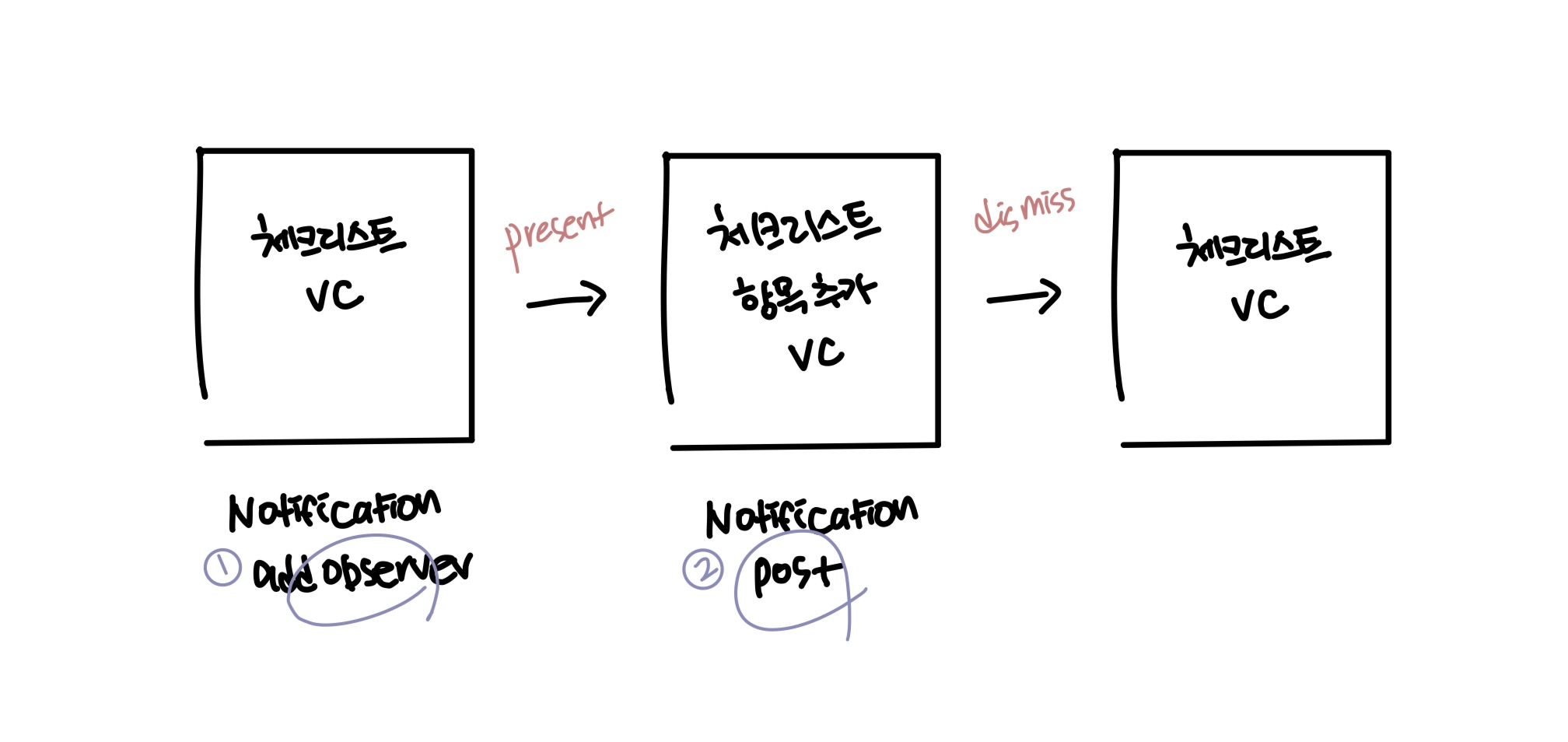
왼쪽: 잘못된 순서로 사용한 예시 / 오른쪽: 올바른 순서로 사용한 예시
문제점
왼쪽 그림에 설명된 문제 상황을 보면 addObserver 해주는 뷰가 생성되기 전에 Post 해줌 ㅠ.ㅠ
Observer를 올바르게 등록하고 알림을 수신할 준비를 하려면 addObserver 과정이 먼저 발생해야 합니다!
무조건 먼저 거쳐줘야 원하는 신호를 관찰 가능하고, 필요한 옵저버가 배치되기 전에 알림이 전송되는 상황을 방지하고 문제를 사전에 감지할 수 있습니다.
해결 과정
NotificationCenter를 통해 값을 전달하는 대신, UserDefaults를 사용하여 저장된 데이터로 체크리스트 생성 상태 확인하고 사용자에게 Custom Alert을 표시해 주는 방법으로 변경하였습니다.
    extension UserDefaults {

        // 새로운 체크리스트를 생성하는 경우를 구분해서 Bool 값으로 저장, true == Custom Alert 띄워주기
        var isCreated: Bool {
            get {
                return UserDefaults.standard.bool(forKey: "isCreated")
            }
            set {
                UserDefaults.standard.set(newValue, forKey: "isCreated")
            }
        }
} // MARK: - 체크리스트 생성 상태 확인 메서드
private func isCreated() {
print(#function)
let isCreatedValue = UserDefaults.standard.bool(forKey: "isCreated")
if isCreatedValue {
// 새로운 체크리스트가 생성된 경우 Custom Alert 띄워주기
showMessage(title: "showMessage_create_title".localized, body: "showMessage_create_body".localized)
UserDefaults.standard.isCreated = false
} else {
print("Value is false")
}
}
2. 클로저 내 self 참조하는 경우 [weak self] 선언하기!
NotificationCenter를 사용하는 다른 뷰들은 정상적으로 작동하는지, 제대로 Deinit 되고 있는지 디버깅하는 과정에서 메모리 누수가 일어나고 있다는 점을 알게 되었습니다...
문제점
체크리스트 생성 시 뎁스가 깊어지는 특성이 있는데 몇 개의 뷰가 제대로 deinit 안되고 있었음 ㅠ.ㅠ
 deinit {
        print("deinit - CategoryChecklistViewController")
        NotificationCenter.default.removeObserver(self)
    }
해결 과정
클로저 캡처 목록에 [weak self] 추가해서 메모리 순환 참조를 방지하였습니다.
    private func configureSubCategoryDataSource() {
        let cellRegistration = UICollectionView.CellRegistration<CategoryChecklistCollectionViewCell, String> {
            [weak self] cell, indexPath, itemIdentifier in
            cell.checkBoxLabel.text = itemIdentifier

            if let selectedItems = self?.selectedItems {
                cell.cellIsSelected = selectedItems.contains(itemIdentifier)
            } else {
                print("selectedItems Error")
            }
        }

        //코드 생략
} private func setLocalized() {
//코드 생략
DispatchQueue.main.async { [weak self] in
self?.mainView.checklistNameLabel.text = "category_checklist_checklistNameLabel".localized(with: subCategoryName)
if let checkItemListCount = self?.checkItemList.count {
self?.mainView.totalCountLabel.text = "category_checklist_totalCountLabel".localized(with: checkItemListCount)
} else {
print("checkItemListCount Error")
}
}
} @objc private func addToMyListButtonTapped() {
//코드 생략
repository.fetch { [weak self, weak addChecklistVC] tasks in
guard let self = self, let addChecklistVC = addChecklistVC else {
return
}
addChecklistVC.checklistTasks = tasks
self.navigationController?.pushViewController(addChecklistVC, animated: true)
}
}
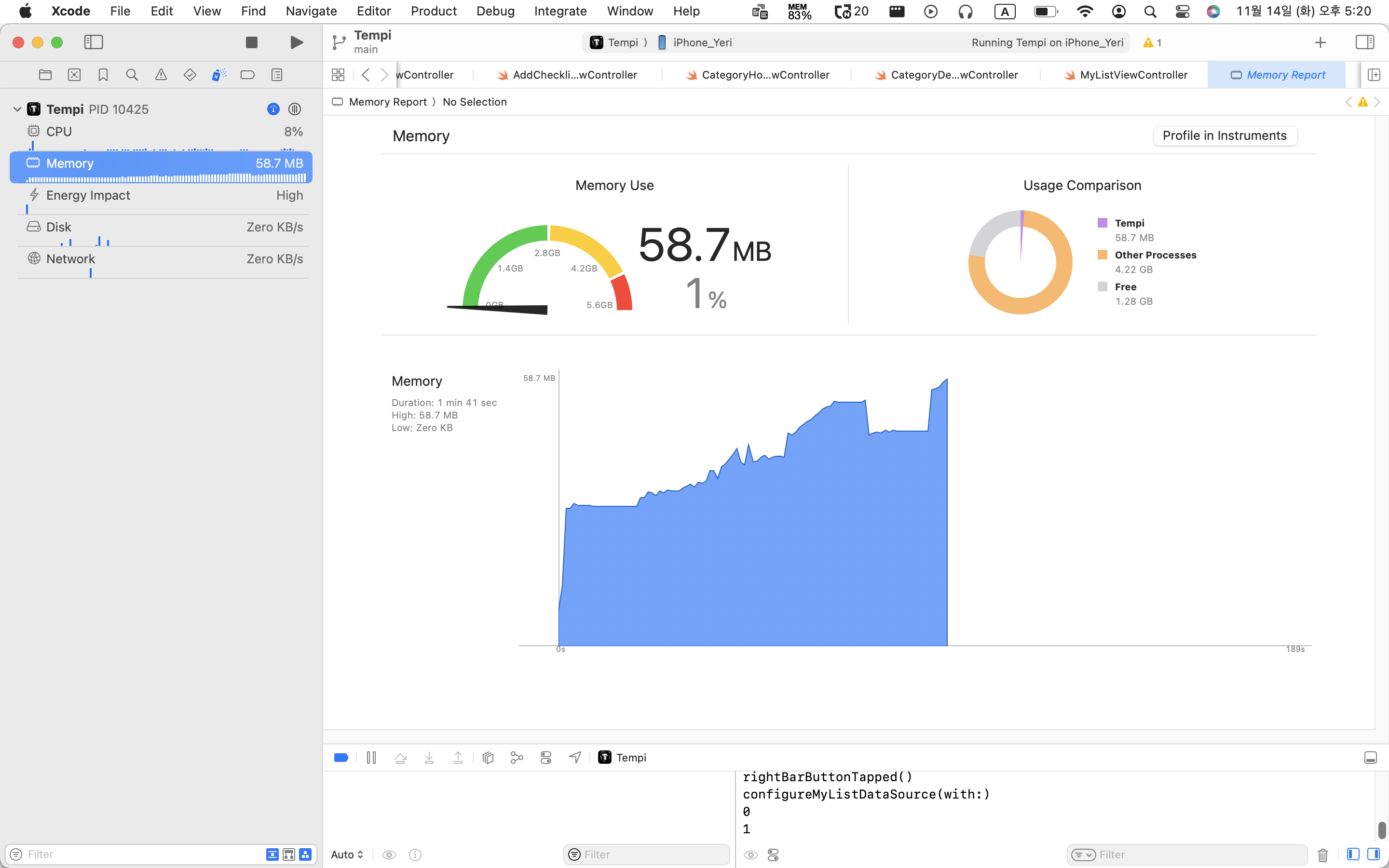
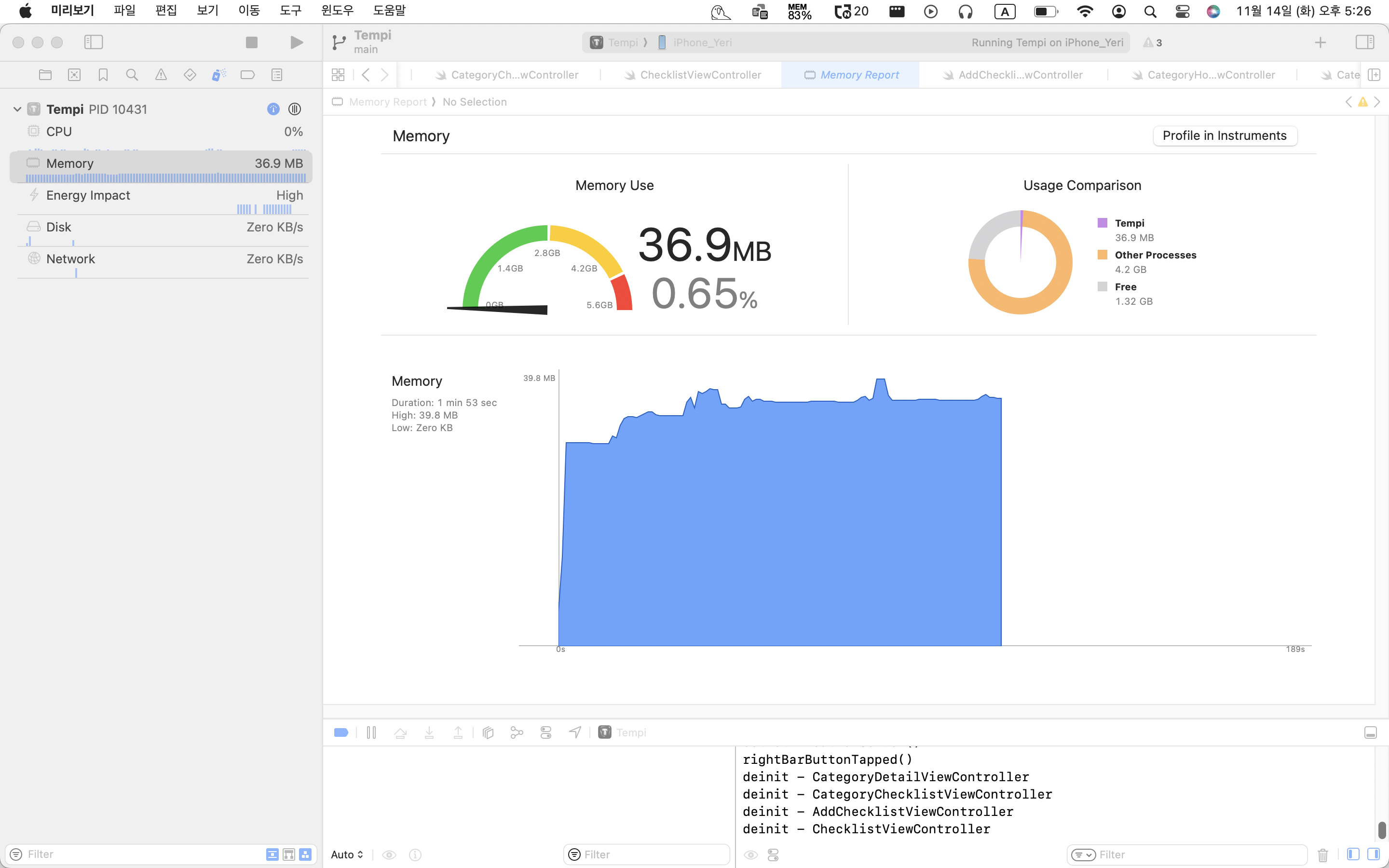
메모리 순환 참조 방지 전/후
# Memory Leak 발생했던 이유
두 개 이상의 객체가 서로를 참조하여 강한 참조 루프를 형성할 때 순환 참조가 발생합니다.
서로 참조를 유지하기 때문에 영구적으로 메모리가 해제되지 않아 메모리 누수(메모리 릭)가 발생하게 됩니다.
# 클로저에서 [weak self] 사용한 이유
클로저 내의 인스턴스(self)를 참조할 때 강한 참조를 이용한다면 강한 참조 순환이 발생할 수 있습니다.
약한 참조는 참조 횟수를 늘리지 않으며 참조된 객체가 할당 해제되면 자동으로 nil이 됩니다.
강한 순환 참조를 방지하기 위해 클로저에서 self를 캡처할 때 weak 키워드를 사용해서 약한 참조 시켜줘야 합니다.
참고한 블로그
https://seons-dev.tistory.com/entry/gg2
Swift : 고급문법 [ARC 메모리 관리 2 - 강한 참조 순환 문제]
본 게시글은 bongcando님의 게시글을 참고하여 작성되었습니다. 강한 참조 순환 문제 순환 참조란 두 가지 이상의 객체가 서로에 대한 강한 참조(Strong Reference) 상태를 가지고 있을 때 발생하며, 순
seons-dev.tistory.com
https://babbab2.tistory.com/27
iOS) 메모리 관리 (2/3) - strong , weak, unowned, 순환 참조
안녕하세여 소들입니다! 저번 포스팅이 길어져서 한번 끊고 가봅니다 :) 뭐 흐름 상 끊어도 될만한 부분이었어서.. ~_~ 이번에 공부할 내용은 뭐 제목에서 써놓은 것처럼 strong weak unowned 순환 참조
babbab2.tistory.com
https://paul-goden.tistory.com/6
클로저에서 [weak self]를 사용하는 이유
목차 1. 클로저에서 self를 weak로 캡쳐하는 이유 2. 강한 참조 순환이 일어나는 경우 3. 약한 참조를 통해 강한 참조 순환을 피하는 경우 4. 결론 클로저에서 self를 weak로 캡쳐하는 이유 강한 참조 순
paul-goden.tistory.com
'iOS > Trouble Shooting' 카테고리의 다른 글
| Cursor-based Pagination 구현하기 (+ Prefetching) (0) | 2023.12.14 |
|---|